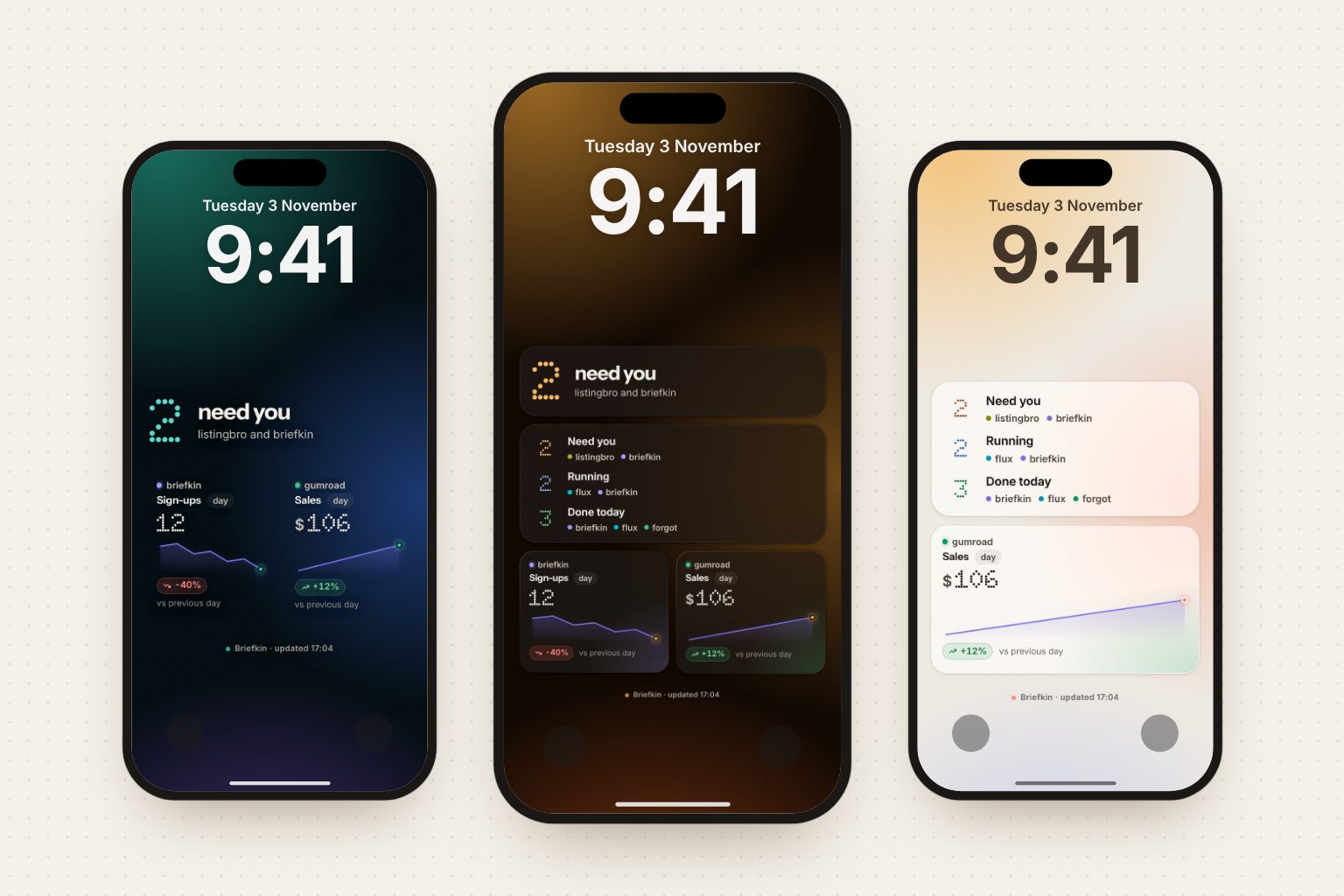
You can put live data on your iPhone Lock Screen without shipping an app. The trick is that iOS will happily fetch an image from a URL and set it as your wallpaper, so if a server draws that image fresh each time, the wallpaper becomes a dashboard. The same URL can also feed a widget through Scriptable. Below: both routes, the refresh limits that decide how live "live" actually is, the failures people hit, and what we measured building this into Briefkin.
Route one: the wallpaper
A Shortcuts personal automation does the work. Apple's own guide, Add automations to Shortcuts on iPhone or iPad, covers the trigger side; the two actions you need are Get Contents of URL and Set Wallpaper Photo.
- Make sure your Lock Screen uses a photo wallpaper. Shortcuts replaces a photo, so if yours is an emoji, a colour or Astronomy, add a photo one first in Settings › Wallpaper. This is the single most common reason the action's wallpaper field is greyed out, as the Daily wallpaper automation tutorial notes.
- In Shortcuts › Automation, tap +, pick Time of Day, set a time, Daily, and Run Immediately. Without Run Immediately you get a notification to tap every single time, which defeats the point.
- Add Get Contents of URL and paste your image URL.
- Add Set Wallpaper Photo, choose Lock Screen, and in its options turn off Show Preview and Crop to Subject. Preview stops the automation dead waiting for a tap; Crop to Subject will happily zoom into a face it thinks it found.
That is the whole mechanism behind apps like Calendarly, which draws your calendar onto the wallpaper and uses exactly this automation to refresh it. One developer did the same thing with 365 pre-rendered calendar images named by date and a midnight automation that fetches YYYY-MM-dd.jpg.
The limit that surprises people: a Time of Day automation fires once a day. Hourly updates means ten automations, each a copy of the same two actions. The cheaper trick is an App automation set to Is Closed on the two or three apps you use most, which fires every time you put one down.
Size matters more than you expect. iOS fills the screen with a wallpaper rather than letterboxing it, so render at the phone's exact pixel size: points times scale, which is 1179 by 2556 on an iPhone 15 and 1320 by 2868 on a 16 Pro Max. Then leave the top third empty, because the clock sits there and will sit on top of anything you put under it.
Route two: the widget
Lock Screen and Home Screen widgets normally need a native app, with one exception: Scriptable runs JavaScript you paste in and renders the result as a widget. Its ListWidget takes a backgroundImage, so a Home Screen widget can be your server-rendered picture at full colour. On the Lock Screen, where iOS draws widgets as monochrome text, you feed it a few lines of JSON instead.
const widget = new ListWidget()
widget.url = 'https://example.com/app'
widget.refreshAfterDate = new Date(Date.now() + 15 * 60 * 1000)
if (config.widgetFamily.startsWith('accessory')) {
  const data = await new Request(LINK + '.json').loadJSON()
  widget.addText(data.inline)
} else {
  const screen = Device.screenSize()
  widget.backgroundImage = await new Request(
    LINK + '.jpg?size=' + config.widgetFamily + '&screen=' + screen.width + 'x' + screen.height
  ).loadImage()
  widget.setPadding(0, 0, 0, 0)
}
Script.setWidget(widget)
config.widgetFamily and Device.screenSize() are what let one script serve every size: the widget tells your server how big it is, and the server renders to fit. widget.url makes a tap open your app or site.
How live is live
This is where expectations need setting. Apple's Keeping a widget up to date is blunt about it: "For a widget the user frequently views, a daily budget typically includes from 40 to 70 refreshes. This rate roughly translates to widget reloads every 15 to 60 minutes." refreshAfterDate is a request, not a promise. The Scriptable forum's widget trigger rate thread lands in the same place: "it's mostly up to the OS."
So: a widget refreshes every 15 to 60 minutes, when iOS decides to. A wallpaper refreshes exactly as often as you make automations for it. Two-minute updates are not on the menu, which means the single most useful thing your image can carry is a timestamp. A dashboard that silently shows two-hour-old numbers is worse than no dashboard.
What breaks
Set Wallpaper fails intermittently. A long Apple Support thread tracks com.apple.extensionKit.errorDomain error 2 from the Set Wallpaper action, reported across iOS 18.0 through 18.1.1, and worked fine on 17.7. Apple marked the feedback "Potential fix identified." The workarounds people settled on are ugly but effective: run the action twice in the same shortcut, or duplicate the automation a minute apart so one of them lands. If you are on an affected build, build the retry in rather than wondering why your wallpaper is stale.
The automation runs but nothing changes. Usually the preview toggle. Show Preview on means Shortcuts opens a confirmation sheet and waits, so a background automation just sits there.
The picture is cropped or zoomed. Either the aspect ratio is wrong or Crop to Subject is on.
What we measured
We built this into Briefkin so a board's status can sit on the Lock Screen, and the rendering side is the part we can report on honestly. The picture is a real screenshot of a real page: a headless Chrome opens the dashboard page at the phone's exact viewport and scale, waits for a data-ready flag the page sets once its fonts have loaded and its layout has settled, and screenshots it. That page reuses the same components the web app does, so the tiles on the phone are the tiles on the board rather than a second implementation that drifts.
Timings from our own runs: a full 1179 by 2556 Lock Screen render took 1.2 to 2.0 seconds end to end and came out at 183 KB as a quality-92 JPEG; a medium widget at 1014 by 474 took 1.3 seconds and 37 KB. Both are small enough that an iPhone on cellular fetches them without noticing. We cache each render against a hash of its contents, so ten automations firing through the day mostly get a cached file, and a browser only starts when something on the board actually changed or the timestamp rolled over.
We have not run a multi-week field test of the Shortcuts automation on a physical phone, so treat the iOS half above as Apple's documentation plus what people report, not as our own measurement.
Our take
We would use the wallpaper route for status you want to see without doing anything, which is the whole point of a Lock Screen: counts, a headline, two or three numbers. We would use the widget route when you want the real design, because a Home Screen widget renders your image at full colour and keeps itself fresh without any automations to set up.
What we would not do is pretend this is a push channel. The honest framing is a dashboard that refreshes a few times an hour, not an alert. For anything that needs to reach you in seconds, use a real notification and keep the Lock Screen for ambient status.
The one design rule we would not skip: stamp the time on the image. Everything else about this approach is a nice convenience; a wallpaper that confidently shows yesterday's numbers is an active liability.
Sources
- Keeping a widget up to date (Apple WidgetKit documentation)
- Add automations to Shortcuts on iPhone or iPad (Apple Shortcuts User Guide)
- Intro to personal automation in Shortcuts (Apple Shortcuts User Guide)
- Shortcuts "Set Wallpaper" Action throws com.apple.extensionKit.errorDomain error 2 (Apple Support Communities thread)
- ListWidget (Scriptable documentation)
- Scriptable widget trigger rate (Automators Talk forum)
- 4 Ways To Make Your iPhone Wallpaper Change Automatically (MacMost)
- Daily wallpaper automation tutorial (Daily app docs)
- A smarter iPhone Lock Screen: how I automated a dynamic calendar wallpaper (Peerlist, Pradeep Palaka)
- Calendarly: Calendar Wallpaper (App Store listing)
Questions
Can I put custom data on my iPhone Lock Screen without writing an app?
Yes, two ways. A Shortcuts personal automation can fetch an image from a URL and run Set Wallpaper Photo, so your Lock Screen background becomes your dashboard. Or the free Scriptable app can draw a Home Screen or Lock Screen widget from a URL you control. Real native Lock Screen widgets with your own layout need an app.
How often can an iPhone widget refresh?
Apple's WidgetKit docs say a frequently viewed widget gets a daily budget of roughly 40 to 70 refreshes, which works out to a reload every 15 to 60 minutes. You cannot force a two-minute refresh, and the refresh time a Scriptable script asks for is a request iOS can ignore.
How often can a Shortcuts automation change my wallpaper?
Each Time of Day personal automation fires once per day, so one automation is one update. Add one per time you want: hourly through your working day is about ten automations. An App automation set to Is Closed fires whenever you leave that app, which updates the wallpaper far more often without more setup.
Why is the wallpaper field greyed out in my Set Wallpaper Photo action?
Shortcuts can only replace a photo wallpaper. If your current Lock Screen uses an emoji, colour, Astronomy or Weather style, add a photo wallpaper first in Settings, Wallpaper, then point the action at it.
Does the image have to be the exact size of my screen?
It should be. iOS does not letterbox a wallpaper, it fills the screen, so an image with the wrong aspect ratio gets cropped. Render at the phone's point size multiplied by its scale: 1179 by 2556 for an iPhone 15, for example.
Is a secret URL safe enough for this?
Treat it like a share link, not a password. Anyone who gets the URL sees whatever the image shows, and your Lock Screen is visible to anyone holding your phone. Keep private detail off it, and make the link rotatable so you can kill a leaked one.