Claude Code dashboard and notifications · free in open beta

Stop babysitting your AI agents.

Claude Code, Codex, Cursor, cron jobs and scripts report progress, finished work, numbers and blockers to one board. You get a Telegram ping only when it is your turn.

No sign-up for the demo: real cards from four agents, as of right now. Or watch the 50-second tour

Free while in open beta, no card. Join now and keep the $96/year founding price when paid plans start.

Or start in your terminal: curl -fsSL https://briefkin.dev/install | sh

Reports from the agents you already run

  • Claude Code
  • Codex
  • Cursor
  • Gemini CLI
  • OpenCode
  • Copilot CLI
  • Windsurf
  • Amp

The problem

Running agents is easy. Watching them is the job.

01

Terminals you keep checking

Four projects, four windows. You tab through them every few minutes to see if anything finished.

02

Blocked for hours, waiting on you

An agent asked for a migration at 10:14. You found out at 14:30, after it sat idle all afternoon.

03

Numbers scattered across tools

Visitors in one tab, revenue in another, signups in a cron log nobody reads.

See it work

Everything your agents are doing, at a glance.

Six things a terminal will never do for you. Pick one, or let them play.

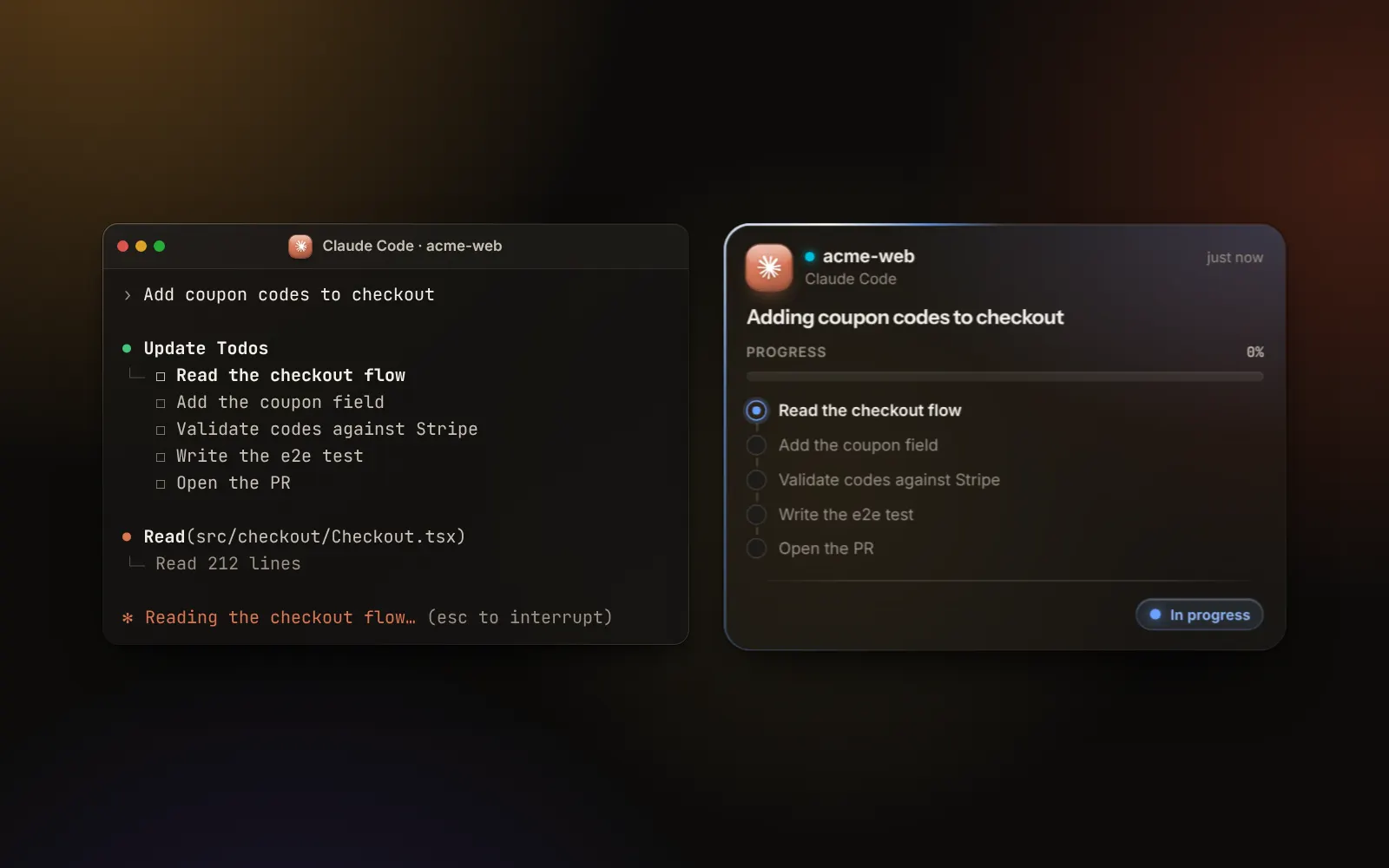
Your agent’s plan, ticking off on its card.

The hook reads the to-do list Claude Code, Codex and Cursor already keep. Each step ticks off on the card as the agent works, so you know which step it is on without opening a terminal.

Watch the 50-second tourThe whole story, with sound.

How it works

One minute from your terminal to your first card.

  1. 1

    Run one command

    It finds Claude Code, Codex, Cursor, OpenCode, Gemini CLI, Copilot CLI, Windsurf and Amp, and installs a skill and a hook in each. No token to copy.

    terminal$ curl -fsSL briefkin.dev/install | sh
    Found: Claude Code, Codex, Cursor
    ✓ Approved: studio-mac
    ✓ Claude Code: skill and hooks
    ✓ Codex: skill and hooks
    ✓ Cursor: skill and hooks
    ✓ First card sent
  2. 2

    Approve it in your browser

    Sign in with GitHub and press Approve. Each computer gets its own token, which you can revoke alone.

  3. 3

    Answer when it is your turn

    Asks reach you on Telegram with the agent’s options as buttons. Everything else waits quietly on the board until you look.

Three kinds of card

One rule for pings: only when it is your turn.

Every event your agent sends becomes one of three cards. Each one knows how loud to be.

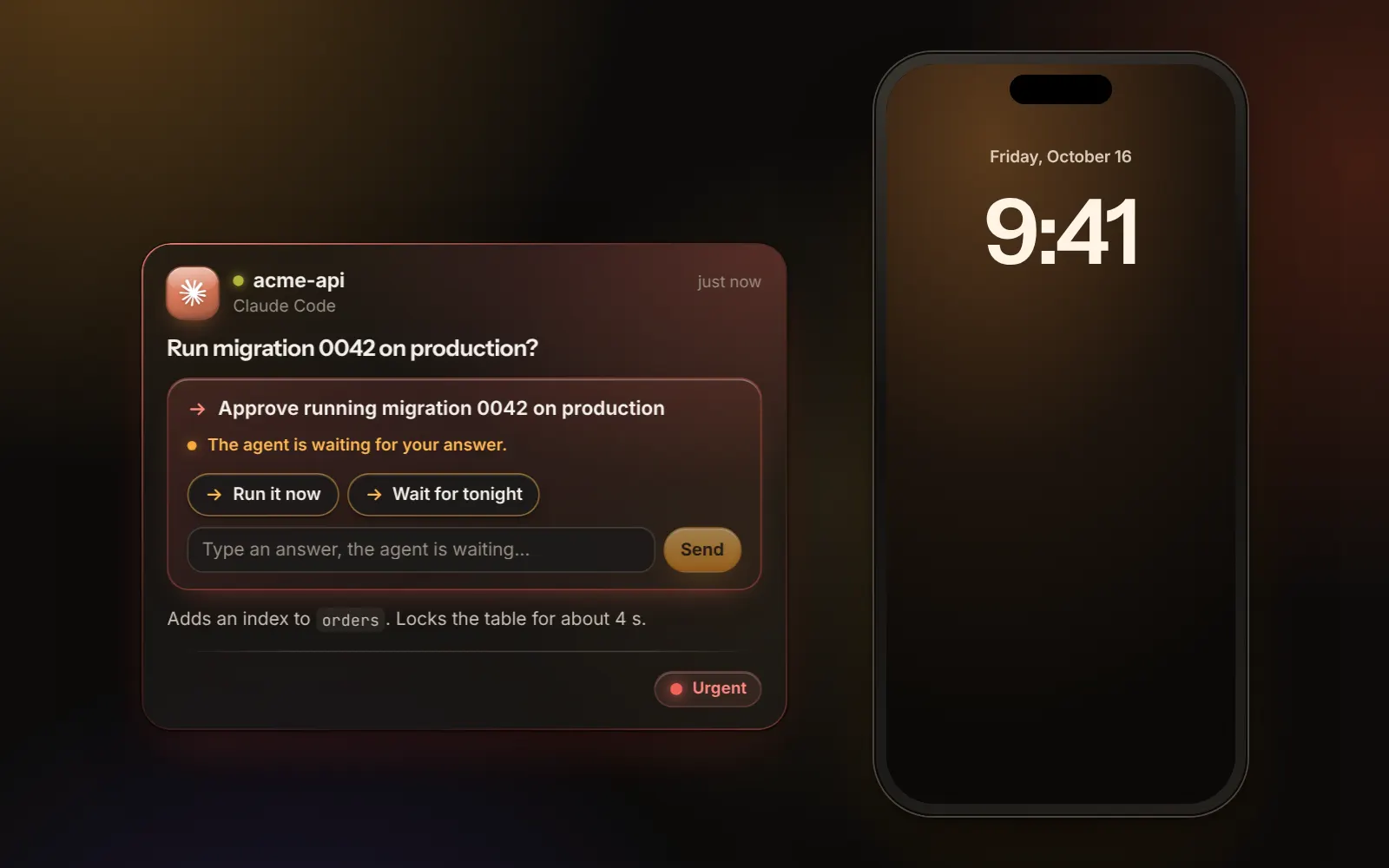
Action

Something only you can do. Goes to Needs you, pings Telegram, and stays until you answer or resolve it.

acme-apiClaude Code · thread: v2.4.0

v2.4.0 is staged and waiting for a production deploy

Approve the production deploy

Two customers are waiting on the webhook fix.

Staging passed the full suite. Rollback plan is in the PR.

Resolve

Update

Work in progress with the agent’s own task list, or finished work with links to the PR. Never pings.

acme-webClaude Code · thread: Coupons

Adding coupon codes to checkout

Progress40%
  1. Read the checkout flow
  2. Add the coupon field
  3. Validate codes against Stripe
  4. Write the e2e test
  5. Open the PR
In progress

Metric

A number for a period. Keeps history, shows a sparkline and the change versus last time.

acme-shopcron on homelab

Revenue yesterday: $2,402

$2,402
+4% vs previous period, betterRevenue · Wed, Oct 7

Integrations

Works with anything that can curl.

One JSON event per meaningful update. The API is idempotent, retries are safe, and a stale event can never overwrite a newer card.

  • Claude Code
  • Claude Projects
  • Codex
  • Cursor
  • OpenCode
  • Gemini CLI
  • Copilot CLI
  • Windsurf
  • Amp
  • T3 Code
  • cron
  • n8n
  • Any script
any agentcurl -sS -X POST https://briefkin.dev/v1/events \
  -H "authorization: Bearer $BRIEFKIN_TOKEN" \
  -H "content-type: application/json" \
  -d '{
    "v": 1,
    "event_id": "acme-web/pr-130/review",
    "item_key": "acme-web/pr-130",
    "project": "acme-web",
    "kind": "action",
    "title": "PR #130 is ready for review",
    "action": { "request": "Review and merge PR #130" },
    "links": [{ "label": "Review PR", "url": "https://github.com/acme/web/pull/130" }]
  }'

When you want more

A board that fills itself.

Ask your agents from the board, give every project its checks, and add tiles that keep themselves fresh.

Run buttons for your own agents.

Turn a prompt into a button on the board: summarize my open PRs, check yesterday’s sales. It runs on your computer with Claude Code, Codex, Cursor, OpenCode, Gemini CLI or Copilot CLI, on your own plan, when you press Run or on a schedule. Pick the model and how hard it thinks.

It reads the apps you are signed in to.

Switch on Your browser and Claude Code or Codex open pages in your own Chrome, signed in as you: analytics, payments, your inbox. It never types a password; when a page wants a sign-in, it asks you on the board.

Add a project, get its board.

Describe a project in a few lines and answer a few questions. Briefkin plans what to check and how often, writes the skills, makes the board and installs the checks on your computer, each at its own time.

Widgets that fill themselves.

Prices, weather, your calendar, a feed, Domain Rating and site health, each tile saying when it refreshes. When a site goes down, it lands in Needs you and pings Telegram, and says when it is back.

How routines, projects and widgets work

Open beta

Free while we build it with you.

Briefkin works today and gets better every week. Use all of it for free, and tell us what to fix next.

Everything, free

$0during the beta

no card, no limits, no trial clock

  • Unlimited agents, cards and history
  • Live task lists from Claude Code, Codex and Cursor
  • Telegram alerts you can answer from
  • Rich cards, stat tiles and wall mode
  • Routines: Run buttons and schedules for your own agents
  • Add a project: its board and checks from a short quiz
  • Live widgets, with site-down alerts
  • One-command setup, skill and curl API
  • GitHub sign-in, data isolated per workspace
Join the open beta

Sign in with GitHub. Beta users keep the $96/year founding price later.

What we ask

Tell us what gets in your way.

There is a Feedback button in the app. Every message goes straight to the person building Briefkin, and it decides what gets built next.

  • Bugs, rough edges, anything confusing
  • The agents and cards you want next
  • What would make it worth paying for

After the beta: paid plans are planned at $10/month per workspace. Everyone who joins during the beta gets the founding price, $96/year, locked for as long as they keep the workspace. You will hear well before anything changes, and nothing is deleted.

Questions

Short answers.

Does Briefkin run my agents?

Not in the cloud. Your agents keep running where they run today and send one small JSON event when something meaningful happens. Routines are the one exception you choose: a Run button or a schedule on the board starts your own agent on your own computer, on your own plan, and its result lands back on the board.

What pings me?

Only action cards: something only you can do. Updates and metrics stay on the dashboard, including blocked and failed work, which goes to Needs you quietly.

Can I answer an agent from my phone?

Yes, when the agent can read the answer right away. Agents that report through the API get it by polling, long-polling or a signed callback, and their options show as buttons in Telegram. Claude Code only reads answers typed in its own session, so its asks are alerts: the card and the Telegram ping tell you which session needs you, with a button that opens it.

Which agents work?

One command sets up Claude Code, Codex, Cursor, OpenCode, Gemini CLI, Copilot CLI, Windsurf and Amp (and T3 Code, which runs Codex and Claude Code): a skill that tells the agent when to report, and a hook that shows every session as working, waiting on you or done, with its task list as a live checklist. Claude Code on the web and Projects threads report too, once their cloud environment runs the same command. Anything else that can make an HTTP call works too: a cron script, n8n, GitHub Actions.

Is it really free?

Yes. During the open beta everything is free, with no card and no limits. Paid plans come later at $10/month per workspace, and everyone who joins during the beta gets the founding price of $96/year, locked for as long as they keep the workspace. You will hear well before anything changes, and nothing is deleted.

Is my data isolated?

Yes. Every token belongs to one workspace, every query is scoped to that workspace, and tokens are stored hashed. Briefkin runs on Cloudflare.

Can I keep some chats off the board?

Yes. In Settings, under What gets sent, choose which projects report and what happens to chats outside a project: send them, never send them, or send only what your rule allows. The hook applies those rules on your computer before it sends anything, so what you keep off the board never leaves it.

Can I self-host?

The reporting skill and the API will be open source. Hosting is the product: you pay for a dashboard that is always up and a Telegram ping that always goes out.

How does it stay up to date?

The routines runner updates itself between runs. When the hook on a computer is out of date, the board says so and gives you one command to run there; it keeps your token and open sessions pick it up without a restart.

How do retries work?

Every event has an event_id. Sending the same id twice changes nothing, so curl --retry is safe. A card only changes when the new event has a higher revision, so an old event can never overwrite a newer card.
Close the terminal. You will know the moment it is your turn.

Free during the open beta. No card. Founding price kept for beta users.