For people who run several Claude Code sessions
Claude Code notifications that reach your phone
A session stops for a permission prompt and you find out twenty minutes later. Briefkin hears every Claude Code session on every computer, pings your phone only when one is waiting on you, and lets you answer from the ping.
Or connect this computer nowcurl -fsSL https://briefkin.dev/install | shClaude Code, Codex, Cursor, Gemini CLI, Copilot CLI, OpenCode, Windsurf and Amp. Free during the open beta.
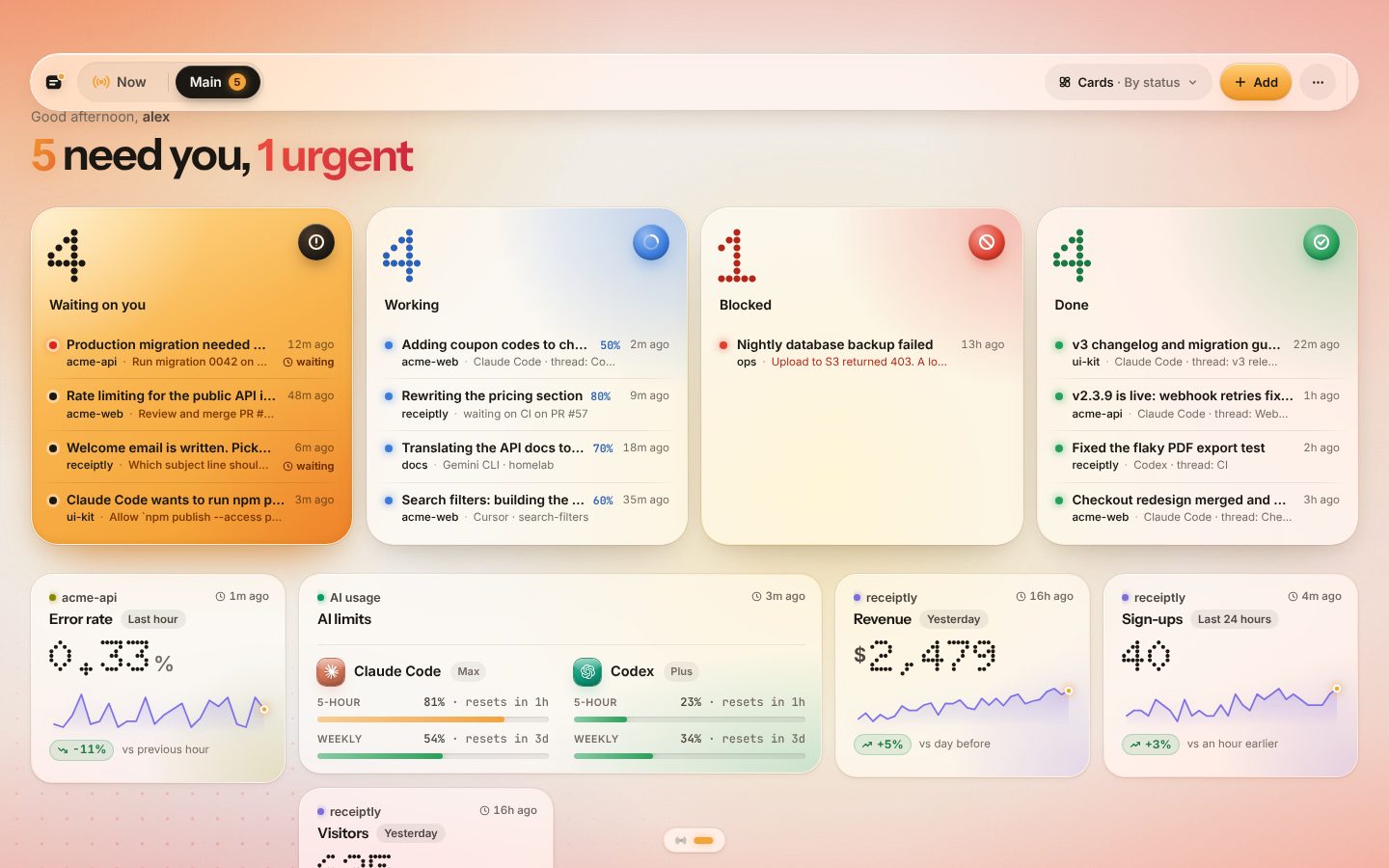 Open the live demo
What you get
Claude Code notifications, done properly
Pings only when it’s your turn
A permission prompt, a question or a session stopped waiting on you. Finished turns land on the board without a sound. A prompt you answer at the keyboard within a minute never pings at all.
On your phone, where you are
Telegram or a web push on your phone, and a board you can open anywhere. Not a desktop popup on the one computer the session happens to run on.
Answer from the notification
Tap Approve or a quick reply in the ping and the agent gets it and carries on. Permission prompts link straight to the session, since those are answered there.
Every session, every computer
Five terminals on your laptop, a cloud session and a cron job on a server, all on one board, each card named after its project and thread.
Codex and Cursor too
The same installer sets up Codex, Cursor, Gemini CLI, Copilot CLI, OpenCode, Windsurf and Amp with their own native hooks.
Your code stays put
The hook sends short status lines, never your code or files. Your “What gets sent” rules apply before anything leaves the computer.
Setup
One minute, one command
Sign in with GitHub
Free during the open beta, no card. Your board opens with the install command on it.
Run one command
It finds Claude Code and your other agents, installs a hook in each and sends a first card. Restart your sessions.
Turn on phone pings
Connect Telegram or allow notifications on your phone. The next permission prompt reaches you wherever you are.
Compared
Versus doing it yourself
Claude Code can ring the terminal bell, and its Notification hook can run a script. That covers one computer. Here is what changes when you run more than one session.
| Terminal bell or desktop popup | Hook script to a push service | Briefkin | |
|---|---|---|---|
| Reaches your phone | No | Yes | Yes |
| Every computer and cloud session | No | One script per machine | Yes, one command each |
| Answer back to the agent | No | No | Yes, from the ping |
| Quiet when you answered at the keyboard | No | No | Yes |
| A board of what is working and done | No | No | Yes |
| Codex, Cursor and other agents | Each its own way | Each its own script | Same installer |
Questions
Short answers
Does Claude Code have notifications built in?
Claude Code can ring the terminal bell or show a system notification, and its Notification hook can run any command you like. Those reach the computer the session runs on. Briefkin uses the hooks to send every session’s state to one board and to your phone.
What exactly sends a notification?
A session waiting for permission, a question the agent asks you, and a session that stopped because it needs your input. Finished work, progress and numbers stay on the board without a ping. Permission prompts wait a minute first, and if you answer at the keyboard the ping is dropped.
Can I answer Claude Code from my phone?
Yes, for anything an agent asks through Briefkin: tap an option or reply in Telegram, or answer on the board, and the agent reads it and carries on. A permission prompt has to be answered in the session itself, so its card links there.
Does it work with claude.ai/code and cloud sessions?
Yes. Allow briefkin.dev in the environment’s network settings and run the installer in the session’s setup script; the docs have the exact line.
What does it cost?
Briefkin is free during the open beta. Beta users keep a $96 a year founding price when paid plans start.
Close the terminal. Your phone will tell you when it’s your turn.
Sign in with GitHub, run one command, and every Claude Code session reports to one board.
Free during the open beta. No card.